現在開発中 — macOSアプリ Now in Development — macOS App

人生を一本の線
記録する。
Record your life
on one line.

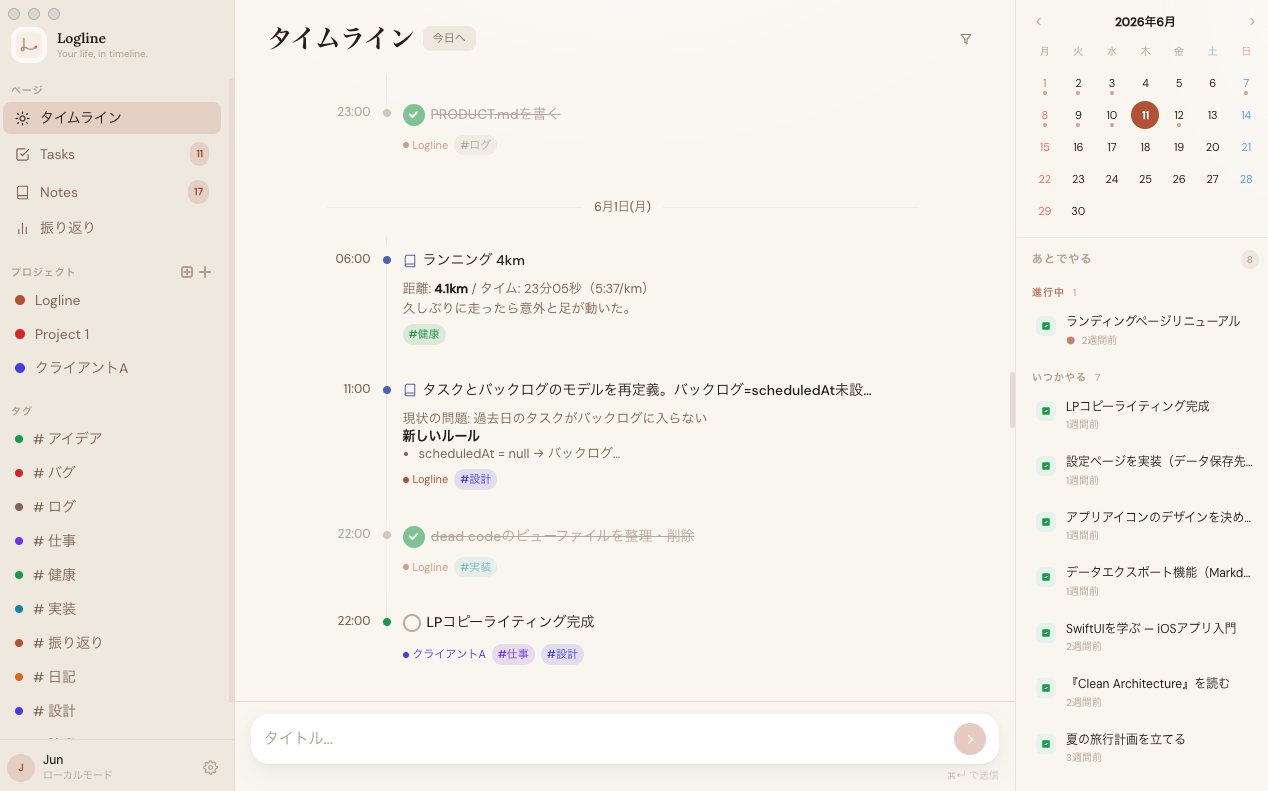
Logline は、思考・タスク・記録をすべて一本の時系列ログとして
管理するmacOSアプリ。Notionより軽く、メモアプリより賢い。
Logline is a macOS app that manages thoughts, tasks, and records as one
unified timeline log. Lighter than Notion, smarter than plain notes.

macOS専用macOS only
ローカルファーストLocal-first
無料で始まる予定Free to start
Logline app — timeline view with backlog and calendar
こんな方のために作っています Built for people who 💻開発者・エンジニアDevelopers 📚研究者・ライターResearchers & Writers 💼フリーランスFreelancers 🧠深く考える人Deep thinkers 📓日常を記録したい人Daily loggers
機能Features

必要なものが、すべて揃っている Everything you need,
nothing you don't.

シンプルに保ちながら、日々の記録に必要な機能をすべて内蔵しています。 Kept simple, but with everything you need to log your days effectively.

🗂
タグ・プロジェクトTags & Projects

タグとプロジェクトで記録を整理。フィルターで必要な記録だけを即座に絞り込む。 Organize with tags and projects. Filter instantly to find exactly what you need.

瞬間キャプチャInstant Capture

⌘N を押すだけ。タイプを選んでEnterで即記録。思考の流れを絶対に止めない。 Press ⌘N. Choose a type. Hit Enter. Never interrupt your flow of thought.

🔍
全文検索Full-text Search

SQLite FTS5 による高速検索。⌘K で即座に過去のすべての記録にアクセス。 Fast search powered by SQLite FTS5. Hit ⌘K to access everything you've ever logged.

📁
フォルダで整理Folders

プロジェクトを「仕事」「プライベート」のようなフォルダにまとめ、サイドバーをすっきり保てる。 Group related projects into folders like Work or Personal — keep the sidebar tidy as things grow.

🗓
D&DスケジューリングDrag to Schedule

バックログのタスクをタイムラインにドラッグするだけでスケジュール完了。 Drag tasks from the backlog onto the timeline to schedule them instantly.

🔗
サブタスク・関連メモSubtasks & Related Notes

タスクにサブタスクや関連メモを紐付け。後からでも親タスクを設定・変更でき、詳細パネルでまとめて確認できる。 Link subtasks and related notes to any task. Set or change the parent anytime, and review them together in the detail panel.

📊
週次振り返りWeekly Review

週次サマリー、タグ別統計、日別ログ。記録が自然に振り返りになる。 Weekly summaries, tag stats, daily logs. What you log becomes your review.

🔒
完全ローカルFully Local

データはあなたのMacのみ。SQLite保存、クラウドなし、サブスクなし。 Your data stays on your Mac. SQLite storage, no cloud, no subscription.

📍
メニューバー常駐Menu Bar Access

メニューバーから今日のタイムラインとバックログをすぐ確認。ウィンドウを開かずにタスクやメモを追加できる。 Check today's timeline and backlog from the menu bar, and capture tasks or notes without opening the main window.
使い方How it Works

3ステップで始まる、
毎日の記録。
Your daily log starts
in 3 steps.

01

思ったことをすぐ記録するCapture what's on your mind

⌘N でクイックキャプチャを開き、タイプを選んでEnter。メモ、タスク、アイデア——すべて同じ操作で記録できます。 Open Quick Capture with ⌘N, choose a type, press Enter. Notes, tasks, ideas — all captured the same way.

⌘ Nクイックキャプチャを開くOpen Quick Capture
⌘ K全文検索Search everything
Esc閉じるClose / dismiss
⌘ ↵保存して閉じるSave and close
02

タスクをスケジュールするSchedule your tasks

バックログに溜まったタスクをドラッグ&ドロップでタイムラインに配置。時間スロットにドロップするだけで予定が完成します。 Drag tasks from the backlog onto the timeline. Drop onto a time slot and your schedule is set.

提案書を書くWrite proposal 明日 10:00Tomorrow 10am
コードレビューCode review 今日 14:00Today 2pm
ドキュメント更新Update docs いつかやるSomeday
03

週次で振り返るReview your week

記録してきたことが自動的に週次サマリーになります。何に時間を使ったか、何を成し遂げたか、一目で把握できます。 What you've logged automatically becomes your weekly summary. See where your time went and what you accomplished.

今週のエントリーEntries this week 34
完了タスクTasks completed 12 / 15
#dev 18
#logline 10
作った理由Why We Built This

「管理」より
「記録」が先にある。
"Logging comes
before managing."

Notionは重すぎる。タスクアプリは思考を切り捨てる。日記アプリはタスクを扱えない。Logline は、その隙間のために作りました。 Notion is too heavy. Task apps cut out thinking. Diary apps can't handle tasks. Logline was built for the gap between them.

  • 思いついたことを、整理する前に記録できるCapture thoughts before organizing them
  • タスクとメモが同じ線の上に並ぶTasks and notes live on the same line
  • データはあなたのものだけYour data belongs only to you
  • シンプルなまま、ずっと使えるStays simple for the long haul
"

タスク管理アプリにノートが乗っているのではなく、ログアプリにタスク管理が組み込まれている。 It's not a to-do app with notes bolted on. It's a log app with task management built in.

— Logline Design Philosophy

早期アクセスEarly Access

一緒に使ってみませんか Want to be
first in line?

現在開発中です。ウェイティングリストに登録しておくと、リリース時に優先的にご連絡します。 Currently in development. Register for the waitlist and you'll be the first to know when it ships.

スパムは送りません。リリース時のお知らせのみ。 No spam. Release announcement only.

FAQ

よくある質問 Frequently Asked Questions

いつリリースされますか? When will it be released? +

現在、開発者自身が日常的に使用しながら品質を磨いています。ウェイティングリストにご登録いただくと、リリース時に優先的にお知らせします。 Currently being polished through daily use by the developer. Register on the waitlist to be notified as soon as it's ready.

無料で使えますか? Will it be free to use? +

コアの機能は無料で使えることを予定しています。価格設定はまだ確定していませんが、過度な課金は行いません。 Core features are planned to be free. Pricing isn't finalized yet, but we won't be aggressive about monetization.

データはどこに保存されますか? Where is my data stored? +

すべてのデータはあなたのMacのローカルに保存されます(SQLite)。クラウドへのアップロードは一切行いません。データはいつでもエクスポートできます。 All data is stored locally on your Mac (SQLite). Nothing is uploaded to the cloud. You can export your data at any time.

WindowsやiPhoneには対応しますか? Will there be a Windows or iPhone version? +

現時点ではmacOSのみを対象としています。まず一つのプラットフォームで完成度を高めることを優先しています。 Currently macOS-only. The priority is perfecting one platform first before considering others.

Notionや他のアプリとの違いは? How is it different from Notion or other apps? +

Notionは「整理してから記録する」ツールです。Loglineは「まず記録する」ためのツール。ページもDBも不要。一本の時系列ラインに、すべての活動が並びます。 Notion asks you to organize before you record. Logline lets you record first. No pages, no databases — just one timeline where everything lives together.